Sabtu, 19 Maret 2011

Exceeded My Expectations

Samsung ATIV Smart PC 500T
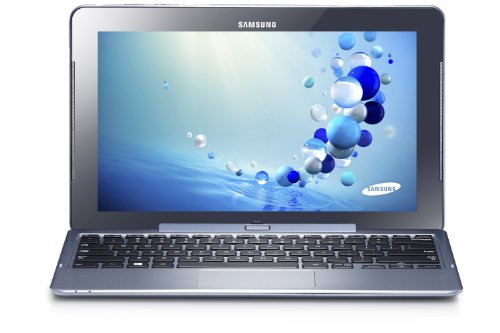
Samsung ATIV Smart PC 500T

I've been lurking around to purchase a new tablet for quite a while now. I began my search about an year ago, so it took me a long time before deciding on a tablet. At the time, I really needed a tablet with a pen, keyboard dock that I can do some basic documenting in, and long battery life. There were no such tablets. I've tried writing on screen with capacitive pen on my old Galaxy Tab 10.1 to no avail. I've purchased a Galaxy Note 10.1 which was a fantastic device, but it wasn't enough for me because it just didn't provide me with enough office experience. Then came Samsung ATIV 500T. This was the second all-in-one tablet I set my eyes on, first being ASUS Vivo Tab Pro. I will make some comparisons below because they are nearly identical products, and I will try to provide reasons why I purchased Samsung ATIV.

Samsung ATIV and ASUS Vivo Tab Pro both runs full Windows 8. This was important to me because I wanted to install some legacy apps, such as Eclipse for doing some coding, Microsoft office and OneNote for some note taking and documenting, and etc. Windows 8 RT was simply not enough and for extra 200-300 bucks, I deemed it unworthy.

Secondly, these two tablets both have its own keyboard dock that follows the aesthetic form of ASUS's TF700T or TF300T, which are the Transformer infinity and Transformer pads. These tablets had a dedicated keyboard dock that would close like an ultrabook which was neat and tidy. I've tried using bluetooth keyboard with a tablet and it was a pain, so I really liked this form factor.

These two tablets had dedicated Wacom digitiser pen included. This was also important because I am an engineer and I often had some note taking to do and some calculations. I've tested S-pen on previously purchased Note 10.1 and I really liked writing on tablet, so I decided to go for these two.

Furthermore, having an Intel Atom processor was a big plus for me. Many would think why one would purchase an Atom when there are i5 or i3 on the market. Well, the biggest reason is battery life. I simply hate carrying around chargers and often there are no outlets to plug it in. By going for Atom, you also remove noisy fan on the back and it is much lighter. I definitely did not need this tablet for gaming or heavy use (which is what my desktop is for) so going for an Atom was a perfect choice.

I decided to purchase ATIV instead of VivoTab pro because I didn't find ASUS tablet noteworthy for extra 200 dollars. They are pretty much the same tablet except the form factor. In my opinion, ASUS's Zenbook-esque tablet is much prettier, and Samsung's blue-ish color on ATIV doesn't catch my attention. However, for 200 dollars, you can get a 64 GB microSD card, a plain black matte skin for the tablet which will make it look nicer, a new digitizer pen with an eraser tip and such. Therefore, after months of researching and struggling, I decided to purchase ATIV.

In Summary:

Pros:
-Long battery life (around 10 hours for me of semi-regular heavy usage
-Wacom based digitizer pen (You can purchase other compatible wacom pens. I bought one today myself)
-microSD slot which increases harddrive space to 128 GB.
-Light weight and no fan
-Full Windows 8. Perfect for non-heavy usage
-Cheaper alternative of convertible tablets
-Awesome keyboard dock with chick layout and feel

Cons:
-Still bit expensive
-Pen is too small for some people
-Tablet is much wider than traditional 10.1 inch tablets. It was not comfortable holding it in the subway
-Lack of accessories
-Some known issues about keyboard or wifi, but not for everyone. These problems are known to be all fixed.

This tablet is for:
-Engineering/Bio or any university students that requires heavy note taking, file management, drawing, calculations, documenting, and such.
-Working people that travels a lot
-Professors who likes to give lecture on a pen-tablet
-E-mail and awesome for using websites like facebook.
-Graphic artists and designers. Absolute must!

This tablet is NOT for:
-Gamers. Period.
-Heavy users that has 20 files open and working on them. The screen is not big enough for that and the tablet won't likely handle it well.

Overall, its been about 2 weeks since I bought this tablet and I've been very happy with my purchase. The start was NOT good since the first tablet I got was defective and did not start up (Got stuck on Auto-repair screen, so when you see such issue, go return it as I have not seen a single solution). I live in Canada (Canadians beware, purchase this tablet ONLY FROM MICROSOFT STORE. Best Buy and Futureshop models are dumbed down models), so I could not purchase from Amazon. I was lucky enough to drive back to the store and get a new one immediately. Staff was friendly enough to make sure that my new device was working perfectly. I am an engineering student + engineer working in the field, so this tablet has been exceptional. I highly recommend this tablet for anyone who is really reconsidering or contemplating, since I've looked into various tablets and struggled on my decision making for a long time. I definitely do not regret buying this tablet.

As a side note, all keyboard and wifi issues have been fixed from Samsung SW updates. Samsung has been very quick with their driver updates. This device originally released with some major software flaws, but they really stepped it up and provided barrage of SW updates. I had to install many updates on the first day and despite not having any problem from the get go, I really do appreciate their effort of making things right. You can check several forums such as TabletPC review and see that most of the people do not have any keyboard issues anymore.

There are some minor disappointments regarding palm rejection. I have included a link to a guide to creating a perfect toggle on/off palm rejection feature in the comments.
If you think the tablet is ugly, Decalrus makes fantastic skins for this device. Some awesome digitizer alternatives are Wacom Bamboo Feel, or Samsung Series 7 Slate Digitizer Pen (AA-DP0NE2B/US).

Get your Samsung ATIV Smart PC 500T Now!

Jumat, 18 Maret 2011

Does what I wanted it to do

Seelye Engineering F Stop Media Gallery

Seelye Engineering F Stop Media Gallery

This App does exactly what I need, and not a lot that I don't. I don't need to attach mustached caricatures of friends to phone transmissions. I don't need to mess with the social media facebook, flickr and so forth.

What I have is hundreds of pictures scattered across nearly twenty folders. This is my salvation. I have tried more than a dozen other photo albums [Scalado was the best of the rest] and Viewer apps. None of them do what this one does. Simply allow me to create an album that I name. Point to a picture where it is, and put it in the new album. Then I can type in sort tags. It has slide show and favorites and more.

Works great on the Kindle. Works OK on ASUS TF300 T tablet, too. Though in order to bring up the Move/Copy/Rename and Add to Album drop down menu from the Picture List mode thumbnails, you need a looonnngg press. It didn't affect my enjoyment and use of the App. You just have to hold it until the thumbnail picture turns blue. The thumbnail sized pictures in List mode are a nice feature in themselves.

The full paid version allows nested sub albums. Great feature.

Elegant simple intuitive. Excellent. Five stars

Get your Seelye Engineering F Stop Media Gallery Now!

Kamis, 17 Maret 2011

way better than expected!

AI Factory Limited Chess Free

AI Factory Limited Chess Free

I have enjoyed playing chess since I was ten years old, although I must admit that, after nearly a half century of playing, I'm still not very good at it. In recent years, I've turned to a variety of computer chess programs in an effort to improve my game.

The best computer-based chess program I've faced is also one of the most recent: "Chess Free," another absolutely superior Android-based game published by AI Factory. I purchased this app shortly after I got my Kindle Fire HD. I now have it installed on both my KFHD and my smart phone, and I've been hopelessly addicted to it ever since.

"Chess Free" has a fairly long list of excellent features that should please chess players from beginner to advanced. As with all AI Factory games, graphics are clear, crisp, and simple yet sophisticated. The chess board and pieces are of the traditional 2D design. Touch screen response is immediate; the chess piece movements are always silky-smooth, without a trace of hesitation.

"Chess Free" has ten levels of difficulty, and keeps track of player statistics at all levels. Players can choose to play against the CPU or against other human opponents. The game's underlying chess engine is "Treebeard," which was developed by AI Factory engineers with the intent of making the game challenging but with a more "human-like" feel to it. In this, I think they have succeeded to a remarkable degree. While playing "Chess Free" at its lowest levels, I have seen the "Treebeard" engine make an occasional and unexpected boneheaded move that makes me feel right at home. Yet, even at the easiest levels, I find the game very challenging indeed.

"Chess Free" is ad supported, but the ads are small and unobtrusive. There is also a paid version of the app that removes the ads. This is an excellent game in every respect. Highly recommended!

Get your AI Factory Limited Chess Free Now!

Rabu, 16 Maret 2011

Simple yet great

SANOXY Female Micro On The Go Adapter

SANOXY Female Micro On The Go Adapter

I have owned cameras in the PowerShot line as well as DSLRs. I purchased this camera to replace an aging PowerShot for everyday use for my family.

The camera as a basic photo box is rather nice. Relative to other point-and-shoot cameras I have owned it is amazing. Relative to my current DSLR tht cost nearly 10x as much it is a bit grainy, but it is on par with my old DSLR from seven years ago. If you just want to point and shoot it does a great job of that.

The camera is in the SX family meaning extended zoom, which it does very well. It has a maximum zoom of 500mm equivalent @ f/6.8. That is a pretty reasonable f-stop at deep zoom, especially when comparing the costs. For comparison, the off-brand Sigma DSLR lens for Canon cameras that reaches 500mm @ f/6.3 costs just over $1000, or much more for on-brand lenses.The picture quality isn't as good as my $3500 DSLR+Lens setup for deep telephoto, but the results are still more than adequate for using on the web professionally.

The camera is full featured. The GPS and auto-tagging is nice for camping and backpacking, or whatever form of travel you are in to. My teens love some of the features like auto-detecting when everyone is smiling and automatically taking a picture, the wink-to-self-timer, and the miniatures mode. Sunsets and flowers look incredible when 'extra vivid' is turned on. It is a good thing it includes all those features because it doesn't have raw data files, which is something I am used to with my DSLRs.

Now the down side.

Canon chose a tiny battery to fit in the tiny case. From an aesthetic viewpoint this makes sense. They want it small, lightweight, travel size. They want it to fit in a pocket.

However, considering the primary use as a travel and camping camera this makes much less sense. Yes, the camera must be conveniently small, but not by sacrificing usability. Recording video goes from a fully charged fresh battery to the camera powering off in about 30 minutes. Leaving the camera on while you walk a trail and take photos gives you slightly more than one hour of battery life.

If you are going camping or backpacking or traveling without a battery charger, plan on going through at least one battery pack per day, possibly more. The battery packs are not very expensive (relatively) which is a good thing because you'll need them.

Get your SANOXY Female Micro On The Go Adapter Now!

Selasa, 15 Maret 2011

Great camera, buy batteries.

Canon PowerShot Digital Stabilized Wide Angle

Canon PowerShot Digital Stabilized Wide Angle

I have owned cameras in the PowerShot line as well as DSLRs. I purchased this camera to replace an aging PowerShot for everyday use for my family.

The camera as a basic photo box is rather nice. Relative to other point-and-shoot cameras I have owned it is amazing. Relative to my current DSLR tht cost nearly 10x as much it is a bit grainy, but it is on par with my old DSLR from seven years ago. If you just want to point and shoot it does a great job of that.

The camera is in the SX family meaning extended zoom, which it does very well. It has a maximum zoom of 500mm equivalent @ f/6.8. That is a pretty reasonable f-stop at deep zoom, especially when comparing the costs. For comparison, the off-brand Sigma DSLR lens for Canon cameras that reaches 500mm @ f/6.3 costs just over $1000, or much more for on-brand lenses.The picture quality isn't as good as my $3500 DSLR+Lens setup for deep telephoto, but the results are still more than adequate for using on the web professionally.

The camera is full featured. The GPS and auto-tagging is nice for camping and backpacking, or whatever form of travel you are in to. My teens love some of the features like auto-detecting when everyone is smiling and automatically taking a picture, the wink-to-self-timer, and the miniatures mode. Sunsets and flowers look incredible when 'extra vivid' is turned on. It is a good thing it includes all those features because it doesn't have raw data files, which is something I am used to with my DSLRs.

Now the down side.

Canon chose a tiny battery to fit in the tiny case. From an aesthetic viewpoint this makes sense. They want it small, lightweight, travel size. They want it to fit in a pocket.

However, considering the primary use as a travel and camping camera this makes much less sense. Yes, the camera must be conveniently small, but not by sacrificing usability. Recording video goes from a fully charged fresh battery to the camera powering off in about 30 minutes. Leaving the camera on while you walk a trail and take photos gives you slightly more than one hour of battery life.

If you are going camping or backpacking or traveling without a battery charger, plan on going through at least one battery pack per day, possibly more. The battery packs are not very expensive (relatively) which is a good thing because you'll need them.

Get your Canon PowerShot Digital Stabilized Wide Angle Now!

Senin, 14 Maret 2011

works great

Leather Carrying Tablet Keyboard Stylus

Leather Carrying Tablet Keyboard Stylus

Many of the reviews submitted for this latest Kindle are from very experienced users who have provided excellent detailed comparisons between this Paperwhite model and previous versions of the Kindle. Many also have experience with the iPad, Nook, and other devices, and have provided comparisons to those products as well.

My background with respect to this product is different. The Kindle Paperwhite is my first e-book reader or tablet type device. I have held off dipping my toe into the water of digital reading although I do some on my iPhone and I use my computer extensively. The Paperwhite sounded attractive enough to me that I decided to finally give the Kindle a try. I wanted to see if I would find this to be a good alternative to printed books (of which I have more than I want to admit), or simply for convenience. I ordered it immediately once the ordering process opened, so my Kindle was delivered to me earlier this week.

From this perspective I therefore offer the following:

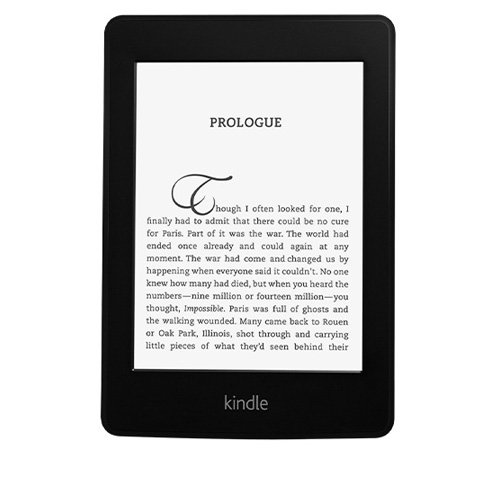
The Kindle is physically quite small and very comfortable to hold. It has a nice black finish and feels good in the hand. The back surface is rubberized. Appearance is elegant. It is very similar in height and width (but not depth, it is much thinner) to a paperback book and the size has clearly been selected to be the best for a book reader. And as other reviewers have commented, it looks like Amazon has found the "sweet spot" for this kind of product because it is very comfortable to hold in the hand.

Setting up and beginning to use has been easy and troublefree. It powered up, located and sync'd to my home network immediately once password was supplied. Connection to the Kindle store was essentially automatic since the unit came pre-loaded with my profile.

Display is very nice. The text is completely readable in all lighting situations that I have tried so far, and from any angle. The backlighting is very effective and satisfactory. The backlighting is not needed in bright sunlight (obviously), but the Kindle does not seem to sense ambient light and adjust backlighting automatically, so if you use it outdoors then I think you need to remember to turn down the backlighting in order to save some battery life. (Or maybe the draw on the batteries from the LED's is so little that you don't need to worry about it). The whiteness of the display is greatest when the backlighting is at maximum. When it is turned to minimum then the screen is more of a cream color. Many of the comments to this version of the Kindle have focused on the pros and cons of this new backlighted display. I do not find the LED's at the bottom of the screen noticeable at all. If you tilt the Kindle and look for them, you can see them. The slight shadowing at the very bottom of the screen that results from the position of the LED lights is only visible in certain combinations of ambient lighting and backlighting and is not at all distracting to me. When I have looked for it, the very small area of shadowing seems to always be just below the last line of text in a book anyway so I don't feel that it is serious. It is appropriate that the backlighting is receiving a lot of attention on this new model, and it was a big part of the reason for my own purchase as well. To me, overall I give the backlighting a score of 95, recognizing that the technology will likely improve and a couple of years from now there will certainly be a new model without this minor artifact.

Linking to the Amazon store and purchasing new titles is astonishingly easy. I purchased the two Lee Child Kindle short novels (Second Son (Kindle Single), and Deep Down: A Jack Reacher Story), and they were practically on my Kindle before I completed the purchase. It took me a short time to figure out how to "borrow" Kindle books for free (as an Amazon Prime member), since it appears that you can only do that from the Kindle itself (duh). (At first since I'm so used to purchasing from Amazon on my computer, I thought I needed to buy the books for the Kindle that way. You can do it, except I don't think that you can do the "borrow for free" from your computer, you have to do that from the Kindle).

Navigating through the options available on the Kindle is easy, although for a new user some time to read through the user's guide (pre-loaded on the Kindle) is needed. Everything is easy to learn and the basic touch screen techniques needed in order to read books are easily picked up and become automatic very quickly. All is controlled via the touch screen - the only "hard" switch is on-off.

Using the Kindle to read a book is simple and intuitive. Touch the page (or swipe) and it turns to the next page. Touch the left side of the screen (or swipe in reverse) to go back one page. Touch the top of the screen to display the menu bar. Saves your last page when you pause reading. Options for highlighting words or portions of text; ability to select words and look up in dictionary or online; as well as other more sophisticated capabilities that I haven't yet explored.

I wanted a simple and inexpensive e-book reader. This Kindle Paperwhite has many capabilities beyond what I need and I'm sure that as I get used to it, I will find myself taking advantage of them from time to time (web browsing, for example). It does not have audio capability nor was I looking for that. This Kindle does exactly what I want, it works well, and is very elegant and well made.

I am very happy with my purchase and looking forward to many years of enjoyment.

(Update, 11/12/12: I agree with the other reviewers who do not like the personalized recommendations that automatically appear on the screen, and I am very happy to see that Amazon agrees and is planning an update to the software to make this optional at the users decision. That is a nice improvement and as always I'm very glad to see Amazon listening to user feedback and working to improve their products.)

Get your Leather Carrying Tablet Keyboard Stylus Now!

Minggu, 13 Maret 2011

Not sure what all the complaining is about

Kindle Paperwhite Touch light

Kindle Paperwhite Touch light

Many of the reviews submitted for this latest Kindle are from very experienced users who have provided excellent detailed comparisons between this Paperwhite model and previous versions of the Kindle. Many also have experience with the iPad, Nook, and other devices, and have provided comparisons to those products as well.

My background with respect to this product is different. The Kindle Paperwhite is my first e-book reader or tablet type device. I have held off dipping my toe into the water of digital reading although I do some on my iPhone and I use my computer extensively. The Paperwhite sounded attractive enough to me that I decided to finally give the Kindle a try. I wanted to see if I would find this to be a good alternative to printed books (of which I have more than I want to admit), or simply for convenience. I ordered it immediately once the ordering process opened, so my Kindle was delivered to me earlier this week.

From this perspective I therefore offer the following:

The Kindle is physically quite small and very comfortable to hold. It has a nice black finish and feels good in the hand. The back surface is rubberized. Appearance is elegant. It is very similar in height and width (but not depth, it is much thinner) to a paperback book and the size has clearly been selected to be the best for a book reader. And as other reviewers have commented, it looks like Amazon has found the "sweet spot" for this kind of product because it is very comfortable to hold in the hand.

Setting up and beginning to use has been easy and troublefree. It powered up, located and sync'd to my home network immediately once password was supplied. Connection to the Kindle store was essentially automatic since the unit came pre-loaded with my profile.

Display is very nice. The text is completely readable in all lighting situations that I have tried so far, and from any angle. The backlighting is very effective and satisfactory. The backlighting is not needed in bright sunlight (obviously), but the Kindle does not seem to sense ambient light and adjust backlighting automatically, so if you use it outdoors then I think you need to remember to turn down the backlighting in order to save some battery life. (Or maybe the draw on the batteries from the LED's is so little that you don't need to worry about it). The whiteness of the display is greatest when the backlighting is at maximum. When it is turned to minimum then the screen is more of a cream color. Many of the comments to this version of the Kindle have focused on the pros and cons of this new backlighted display. I do not find the LED's at the bottom of the screen noticeable at all. If you tilt the Kindle and look for them, you can see them. The slight shadowing at the very bottom of the screen that results from the position of the LED lights is only visible in certain combinations of ambient lighting and backlighting and is not at all distracting to me. When I have looked for it, the very small area of shadowing seems to always be just below the last line of text in a book anyway so I don't feel that it is serious. It is appropriate that the backlighting is receiving a lot of attention on this new model, and it was a big part of the reason for my own purchase as well. To me, overall I give the backlighting a score of 95, recognizing that the technology will likely improve and a couple of years from now there will certainly be a new model without this minor artifact.

Linking to the Amazon store and purchasing new titles is astonishingly easy. I purchased the two Lee Child Kindle short novels (Second Son (Kindle Single), and Deep Down: A Jack Reacher Story), and they were practically on my Kindle before I completed the purchase. It took me a short time to figure out how to "borrow" Kindle books for free (as an Amazon Prime member), since it appears that you can only do that from the Kindle itself (duh). (At first since I'm so used to purchasing from Amazon on my computer, I thought I needed to buy the books for the Kindle that way. You can do it, except I don't think that you can do the "borrow for free" from your computer, you have to do that from the Kindle).

Navigating through the options available on the Kindle is easy, although for a new user some time to read through the user's guide (pre-loaded on the Kindle) is needed. Everything is easy to learn and the basic touch screen techniques needed in order to read books are easily picked up and become automatic very quickly. All is controlled via the touch screen - the only "hard" switch is on-off.

Using the Kindle to read a book is simple and intuitive. Touch the page (or swipe) and it turns to the next page. Touch the left side of the screen (or swipe in reverse) to go back one page. Touch the top of the screen to display the menu bar. Saves your last page when you pause reading. Options for highlighting words or portions of text; ability to select words and look up in dictionary or online; as well as other more sophisticated capabilities that I haven't yet explored.

I wanted a simple and inexpensive e-book reader. This Kindle Paperwhite has many capabilities beyond what I need and I'm sure that as I get used to it, I will find myself taking advantage of them from time to time (web browsing, for example). It does not have audio capability nor was I looking for that. This Kindle does exactly what I want, it works well, and is very elegant and well made.

I am very happy with my purchase and looking forward to many years of enjoyment.

(Update, 11/12/12: I agree with the other reviewers who do not like the personalized recommendations that automatically appear on the screen, and I am very happy to see that Amazon agrees and is planning an update to the software to make this optional at the users decision. That is a nice improvement and as always I'm very glad to see Amazon listening to user feedback and working to improve their products.)

Get your Kindle Paperwhite Touch light Now!